

These days smartphones are no longer limited to just calling and messaging. Phones have already replaced many gadgets like cameras, music players, navigation devices and even small gaming machines. Now Google is working on another interesting feature that could take smartphones in a new direction. According to reports, Google Pixel Desktop Mode could be introduced for Google Pixel phones. With the help of this feature, a Pixel smartphone could be connected to an external monitor, keyboard and mouse and used like a desktop computer. In simple words, in the future your smartphone itself could become your mini computer.
What Is Desktop Mode And How It Will Work
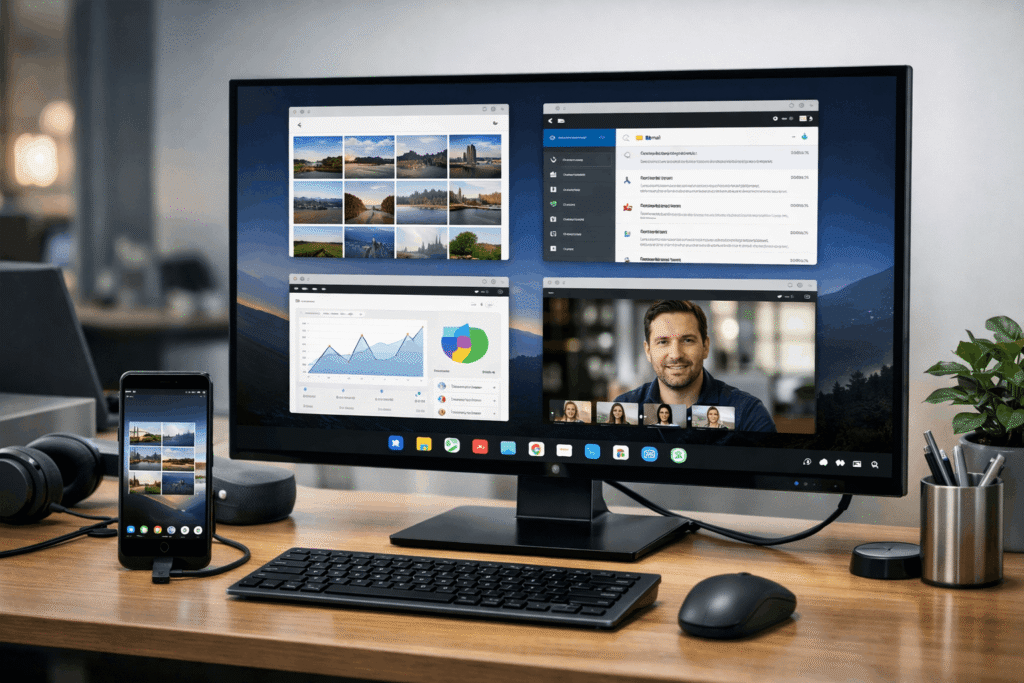
The concept of Desktop Mode is quite simple but it can be very powerful. When a Pixel phone is connected to an external monitor, the phone could show a desktop-style interface. This interface may feel similar to a laptop or computer where apps can open in separate windows. Normally on a smartphone apps open in full screen, but in desktop mode apps could be moved, resized and used side-by-side. The most interesting thing is that even when the phone is connected to a monitor it will continue to work normally. This means calls, messages and notifications will still arrive on the phone.
Turning A Smartphone Into A Workstation

The main idea behind this feature is to turn a smartphone into a portable workstation. If a user has a monitor, keyboard and mouse available, they could connect their phone and create a desktop-like setup. A typical setup may include an external monitor, a Bluetooth or wired keyboard, a mouse or trackpad and a USB-C hub or docking station. Once these devices are connected, the phone itself will power the entire setup and the monitor will work as the main screen. This means tasks like writing documents, browsing the internet, handling emails or attending online meetings could be done directly from the phone.
Multitasking Could Become Much Easier
One major advantage of Desktop Mode could be multitasking. In this mode users may be able to keep multiple apps open at the same time. For example, a document could stay open on one side while research is being done in a browser on the other side. If needed another app could also stay open for messaging or video calls. This experience may feel quite similar to what people already use on computer systems like Microsoft Windows and macOS. Because of this productivity could improve significantly.
Freedom To Resize And Arrange Apps
Another useful feature of Desktop Mode could be the ability to resize and move apps. Users may be able to make windows smaller or larger and arrange them across the screen according to their needs. For example someone could keep the browser on half of the screen and a notes app on the other half. Layouts like this are very helpful for productivity tasks.
File Management Could Become Much Simpler
One big benefit of a desktop environment is easier file management. If Google introduces a desktop-style interface, users may be able to manage files through simple drag-and-drop actions. For example an image could be added directly into a document or a file could be attached to an email more easily. This could give Android a hybrid experience between mobile and desktop computing.
Working With Keyboard And Mouse Could Feel More Natural
Touchscreens are convenient but when it comes to productivity tasks a keyboard and mouse make a big difference. Desktop Mode may support external keyboards and mice so users can type faster and navigate easily. Keyboard shortcuts may also help users complete tasks more quickly. Because of this the overall experience could feel much closer to using a real computer.
Could Smartphones Replace Laptops
Modern smartphones have become extremely powerful. With advanced processors, larger RAM and faster storage many flagship phones already deliver performance close to entry-level laptops. If Desktop Mode works smoothly in the future, smartphones could become an alternative to lightweight laptops. This would especially benefit people who mainly use devices for browsing, document editing and communication.
Helpful For Students And Remote Workers
Desktop Mode could be very useful for students and remote workers. Students may be able to write assignments, research topics and manage study material using their phone connected to a monitor. Remote workers could also benefit when working from different locations. In many cases they may not need to carry an extra laptop.
A Convenient Option For Travelers
People who travel frequently often prefer carrying fewer gadgets. If a smartphone can function like a computer, travelers might only need a small portable monitor and keyboard. This could allow them to quickly create a temporary workspace in a hotel room or a co-working space.
New Opportunities For Android Developers
Desktop Mode could also open new opportunities for developers. They may start designing apps optimized for larger screens with better layouts and more advanced tools. Productivity apps, creative software and communication platforms could become more powerful in a desktop-style interface. In the future Android apps may be designed to work smoothly on both mobile and desktop environments.
Smartphone Power Continues To Grow
The reason this concept is becoming possible is the increasing power of smartphone hardware. Today’s phones can handle demanding tasks like gaming, AI processing and even video editing. With more RAM and faster storage performance has improved significantly. Because of this many companies are now exploring ways to turn smartphones into full computing devices.
Some Challenges May Still Exist
Even though Desktop Mode sounds exciting there could still be some challenges. Not all Android apps are currently optimized for large screens or window-based interfaces, so developers may need time to update their apps. The interface will also need to be designed carefully so it feels smooth when used with a keyboard and mouse. For some heavy professional tasks powerful desktop computers may still be required. However for everyday productivity tasks a smartphone-based setup could work very well.
The Way We Use Computers May Change
For years the tech industry has talked about a single device that can handle everything. Desktop Mode could be another step in that direction. If smartphones truly start working like computers people may no longer need to carry multiple devices. A single powerful device could adapt to different situations.
Final Thoughts
Google introducing desktop capabilities for Pixel phones could push smartphones toward a new level of productivity. If the feature works smoothly and developers build apps optimized for it, smartphones may become far more powerful work tools. In the future it is possible that instead of carrying a laptop many people will rely on a powerful smartphone that fits easily in their pocket.
FAQ
What is Google Pixel Desktop Mode?
Google Pixel Desktop Mode is a feature that could allow Pixel smartphones to connect to an external monitor, keyboard and mouse and work like a desktop computer.
Which phones may support Desktop Mode?
The feature is expected to appear on supported Google Pixel smartphones, especially newer models with powerful hardware.
Can a smartphone replace a laptop with Desktop Mode?
For basic productivity tasks like browsing, document editing and emails, a smartphone with desktop mode could work as an alternative to a lightweight laptop.
Do you need extra accessories to use Desktop Mode?
Yes, users will likely need an external monitor, keyboard, mouse and possibly a USB-C hub or docking station.
Will all Android apps work in Desktop Mode?
Most apps may run, but developers may need to optimise their apps for larger screens and window-based layouts for the best experience.

